
If you are looking for a plug & play retro console for your TV that is compact, preloaded with thousands of games, and compatible with classic emulators, you have likely come across two very popular models within the Retro Game Stick category: the Retro Game Stick M8 Lite and the M15 Pro.
Both offer a similar concept—ready-to-use retro games, wireless controllers, and an HDMI connection—but they present key differences in power, compatibility, emulation quality, and overall user experience.
In this detailed comparison between the M8 and the M15, we analyze their main features to help you choose the best option according to your gaming style and needs.
📊 Technical Comparison: Retro Game Stick M8 vs M15
| Feature | Retro Game Stick M8 | Retro Game Stick M15 |
|---|---|---|
| Type | HDMI Plug & Play Stick | HDMI Plug & Play Stick |
| Included Memory | 64 GB | 64 GB / 128 GB |
| Pre-installed Games | 20,000+ games | 20,000–40,000 games |
| Resolution | Up to 4K | Up to 4K |
| User Interface | Simple and functional | Visual with box art |
| Supported Emulators | +20 classic systems | +40 classic systems |
| Emulated Consoles | NES, SNES, GBA, PS1, MAME, etc. | PS1, PSP, N64, Dreamcast, etc. |
| Expansion | Yes (microSD) | Yes (microSD) |
| Recommended For | Casual users / Beginners | Users seeking power & compatibility |
🛒 Shop Now
Explore these two HDMI Game Sticks and choose the one that best fits your gaming style:
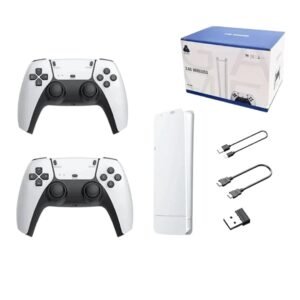
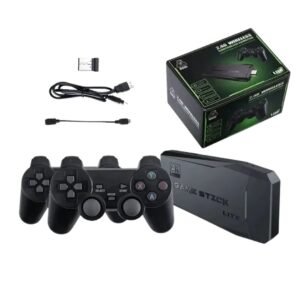
⚙️ Performance and Emulation: Which one handles retro games better?
At TheCorePlay, we have analyzed how each model behaves with emulators from different generations and the level of fluidity they offer.
🔸 Retro Game Stick M8: Solid Classic Performance
The M8 offers stable performance for 2D emulation and classic platforms. It is perfect for playing titles from consoles like NES, SNES, GBA, or PS1 smoothly.
✔️ Games like Super Mario Bros or Crash Bandicoot run flawlessly.
⚠️ In more demanding systems like PSP or N64, performance is variable and may experience frame drops.
🔹 Retro Game Stick M15: Better Optimization and Compatibility
The M15 stands out with superior hardware support and a refined system, which is especially noticeable when emulating consoles like PSP, Nintendo 64, and Dreamcast.
✅ In our tests, titles like Tekken 6 (PSP) or Zelda: Ocarina of Time (N64) ran with much better stability than on the M8.
🧠 TheCorePlay Technical Verdict
- M8 Lite: Optimal performance for classic 2D and 16-bit platforms.
- M15 Pro: The best choice if you also want to play 3D titles from PSP or Dreamcast with greater fluidity.
🎮 Interface, Controllers, and Experience
Both consoles share the same plug & play format and include 2.4G wireless controllers, but their navigation and “game feel” differ.
- M8 Interface: Minimalist and folder-based. Very straightforward for those who just want to pick a game and play immediately.
- M15 Interface: Features a more polished visual UI with game box art, categories, a favorites system, and search functionality. This makes navigating through thousands of games much easier.
🗂️ Catalog and Expansion
The M8 usually comes with a 64GB card and about 20,000 games. It’s a great curated collection for casual users. On the other hand, the M15 Pro is available in 128GB versions, offering up to 40,000 titles and better support for adding your own ROMs.
✅ Conclusion: Which one should you choose?
🟨 We recommend the Retro Game Stick M8 if:
- You want an affordable and simple console for classic 2D gaming.
- You prefer a fast, functional, and “no-fuss” interface.
🟦 We recommend the Retro Game Stick M15 if:
- You want a more advanced experience with a visual UI and search features.
- You are interested in playing PSP or N64 titles with better performance.
Ready to play? Choose the console that fits you best and start enjoying your favorite retro titles today!
